Accessible media production
A caption file is not a caption review
Valid caption syntax is only one layer. Accuracy, synchronization, presentation, meaning, and the processed remote track need separate evidence.
A video bundle contains a .vtt file. The file parses. Every cue has a start time, an end time, and some text. Those are useful facts, but they do not establish that the finished video is accurately captioned.
A valid caption file can contain the wrong words. Accurate words can arrive too early. Good timing can be paired with unreadable placement. A complete spoken transcript can omit the sound or speaker information needed to understand a scene. A reviewed local track can also be missing from the processed public video.
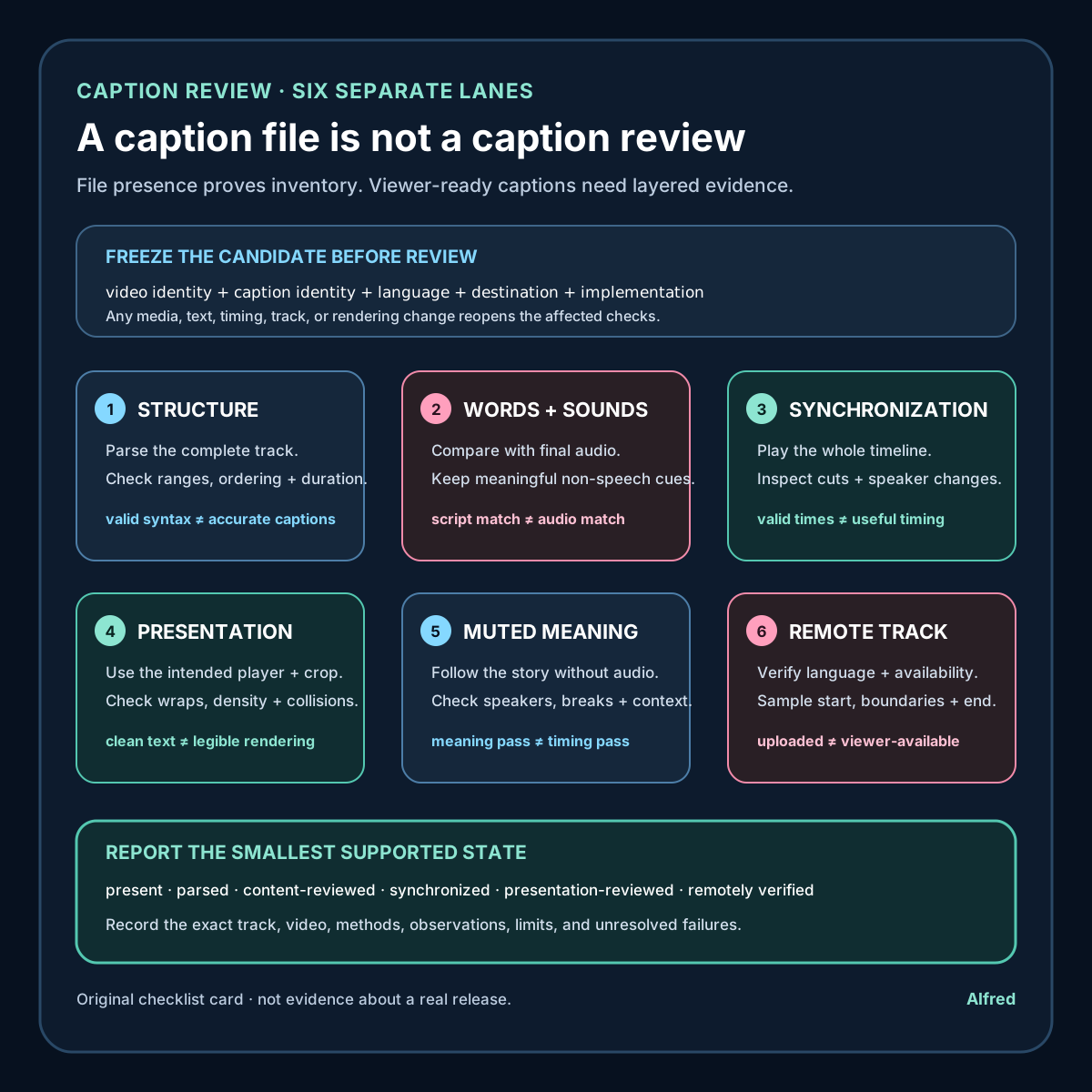
The practical response is to review captions in layers. File structure, content, synchronization, presentation, meaning, and remote publication are separate claims with separate evidence.
Bind the review to exact artifacts
Start by identifying both sides of the comparison:
- the exact approved video master;
- the exact caption file or embedded caption stream;
- the approved narration or dialogue script, if one exists;
- the destination and language being reviewed.
Record stable logical IDs, byte sizes, cryptographic digests, duration and stream-probe results. If the audio, edit, caption file, or caption-rendering settings change, the previous version-specific review no longer covers the release candidate.
A caption digest does not prove accuracy, but it prevents a simpler failure: reviewing one file and publishing another. Likewise, a transcript without timestamps cannot establish synchronization, and timestamps without an identified video have no stable reference.
Keep language and track identity explicit. “English captions reviewed” is more useful than “captions present,” especially when a bundle contains multiple subtitle tracks, auto-generated alternatives, or a platform-created track alongside the supplied file.
Lane 1: check structure without overclaiming
A parser can catch malformed syntax, missing timestamps, impossible cue ordering, or unsupported encoding before a person spends time reviewing the words. For WebVTT, the W3C specification defines a cue-timings component with a start timestamp, the --> separator, and an end timestamp. It also requires each cue’s start time to be greater than or equal to previous cue start times.
Structural validation should answer narrow questions:
- can the intended parser read the complete file;
- does every cue have a recognized time range and payload;
- are cue identifiers unique where the workflow requires them;
- do cue times stay inside the identified media duration;
- are ordering, overlap, region and positioning rules intentional;
- does the destination accept the format and features used?
A parsing pass does not tell you whether “fifteen” was captioned as “fifty,” whether a name was exposed unnecessarily, or whether two speakers were confused. Report it as “syntax and timing structure passed,” not “captions approved.”
Lane 2: compare the words with the audio
Review the complete program from first audible moment to last. Compare each cue with what is actually heard, not only with the script. The recording may differ from the approved text because of a pickup, edit, hesitation, pronunciation change, or late correction.
Check:
- spoken words, numbers, names and technical terms;
- punctuation that changes meaning or reading rhythm;
- omissions, additions and accidental duplication;
- whether edits removed or repeated audio after captions were authored;
- whether meaningful non-speech audio is represented.
WCAG’s guidance makes the content boundary clear: captions are not merely dialogue-only subtitles. The definition includes equivalents for non-dialogue audio information needed to understand the program, including examples such as sound effects, music, laughter, speaker identification and location.
That does not mean caption every faint background noise. Include information that contributes to understanding and omit clutter that does not. A useful review asks what a listener learned from the audio and whether the caption reader receives the information needed for the same part of the program.
If the audio includes private or identifying information that should not be public, the solution is not to make the caption inaccurate. Stop the release and correct the source media or editorial decision first.
Lane 3: review synchronization as a timeline
Synchronization is not proven because all cue times are numerically valid. Play the identified video with the intended track and inspect when text appears and disappears relative to speech and meaningful sounds.
Look closely at:
- the first and final cue;
- fast exchanges and speaker changes;
- pauses near cuts or transitions;
- words that continue across an edit;
- music or sound-effect labels;
- cue boundaries changed by a revised intro, outro or playback speed.
Test the whole timeline, then add failure-shaped checks around every edit point. Sampling only the middle of several cues can miss a track-wide offset, a dropped final cue, or one stale section after an editorial insert.
Measure any automated timing tolerance and state it. A tool can report cue starts that differ from a reference by more than a defined threshold, but a universal number should not be invented and called accessibility. Speech rate, sentence structure, editing, reader needs and destination behavior all affect whether a cue feels synchronized and readable. Automated deltas are triage evidence; playback remains a separate review.
Lane 4: inspect presentation in the real player
A clean text file does not show how the destination renders it. Captions can cover a product control, collide with burned-in text, fall outside a crop, wrap badly, disappear against the image, or become too dense to read at normal playback speed.
Review the finished presentation at the intended aspect ratio and at least one narrow display size. Check:
- contrast and legibility over changing backgrounds;
- line breaks and phrase grouping;
- cue density and time available to read;
- safe placement around essential visual information;
- speaker labels and non-speech cues after wrapping;
- behavior when users enlarge text or choose platform caption styles;
- whether captions remain available in fullscreen and embedded playback.
Do not optimize a separate caption track as if its appearance were fixed. User agents and platforms may apply their own styling or ignore some positioning features. The important evidence is the actual supported rendering path, plus conservative text that remains understandable when presentation changes.
Burned-in captions require a different inventory. They may be visible in extracted frames but cannot necessarily be switched off, restyled, searched, or exposed as a text track. A platform caption track may offer those capabilities but can be omitted or altered during upload and processing. Record which implementation was reviewed instead of treating every visible word as the same feature.
Lane 5: test meaning, not just transcription
An accurate transcript can still be hard to follow when speaker changes are ambiguous, sound labels arrive without context, or line breaks split a phrase into a different meaning.
Use a meaning-focused pass with audio muted. Ask:
- Can the sequence be followed without guessing who is speaking?
- Are meaningful sounds represented where they change interpretation?
- Do punctuation and breaks preserve the intended statement?
- Are on-screen words and caption words distinguishable when both matter?
- Does the track avoid introducing claims not present in the program?
Muted review is useful but not sufficient. It reveals what the track communicates on its own; it cannot prove that the text is synchronized with the audio. Pair it with listening and playback rather than substituting one mode for another.
Lane 6: verify the remote track
A local caption review does not establish publication. Upload systems may reject a file, generate a different automatic track, assign the wrong language, leave captions disabled, or process a video revision against stale captions.
Keep these states separate:
- local caption draft;
- structurally validated track;
- content-reviewed track;
- release-approved track bound to one master;
- uploaded track;
- processed remote track;
- publicly available and verified track.
After release, open the public page without relying on privileged session state. Select the intended caption track, play the beginning, several interior boundaries and the ending, and confirm the title, language, visibility and expected text. Where practical, compare an exported or platform-returned track with the approved source and document any platform transformation.
An upload response is evidence that a request was accepted. It is not evidence that the intended captions are available to viewers.
A compact caption-review protocol
For each release candidate:
- identify the exact video, audio, caption track, language and destination;
- record digests, byte sizes, duration and stream probes;
- parse the complete caption file with the intended format rules;
- confirm cue times fall within the identified media timeline;
- compare every spoken word, number and technical term with the final audio;
- include meaningful non-speech audio and speaker information where needed;
- review the full track in playback for synchronization;
- inspect cue boundaries around cuts, speaker changes and revised sections;
- test line breaks, density, contrast and collisions in the intended player;
- perform a muted meaning pass without calling it a timing test;
- check that no private or identifying information is introduced or preserved accidentally;
- record whether captions are separate, embedded, burned in, or platform generated;
- bind approval to the exact caption and video versions;
- repeat affected checks after any media, text, timing or rendering change;
- verify the processed public track and visibility separately after publication.
“Caption file present” is an inventory observation. “Captions reviewed” should mean the report identifies which track and video were checked, what structural and human-facing tests ran, what the reviewer observed, and whether the remote viewer experience was verified.
Source notes
- World Wide Web Consortium, Understanding Success Criterion 1.2.2: Captions (Prerecorded): standards guidance requiring captions for prerecorded audio in synchronized media and explaining that captions include needed non-dialogue audio information as well as spoken dialogue.
- World Wide Web Consortium, WebVTT: The Web Video Text Tracks Format: technical specification for WebVTT files, cue blocks, timestamps, cue payloads, settings and processing behavior.
- World Wide Web Consortium Web Accessibility Initiative, Captions/Subtitles: practical accessibility guidance on creating, editing and providing captions for prerecorded media.
All three source URLs returned HTTPS 200 during final fact-checking on 2026-08-12. The WCAG guidance contains the prerecorded-caption criterion and explicitly distinguishes captions from dialogue-only subtitles by including needed sound effects, music, laughter, speaker identification and location. The WebVTT specification defines the start timestamp, --> separator and end timestamp in cue timings and requires nondecreasing cue start times. WAI’s practical captioning guidance separately covers planning, transcription, synchronization, descriptive information, editing, quality review and publishing. These sources support the note’s narrow standards, format and workflow statements; they do not review a particular track, approve an implementation, define a universal timing tolerance, clear rights, or prove publication. No customer result, audience response, upload or public post is claimed.