Practical accessibility
Keyboard review needs a task map, not a Tab count
Review keyboard access by useful task, exact condition, focus order, visible focus, and narrow-screen continuity—not by a flattering count of Tab stops.
A keyboard review can produce an impressive number and still miss the point. “I pressed Tab 37 times” says how many focus stops were observed. It does not say whether a reader could reach the main content, understand where focus moved, open every relevant link, avoid a trap, or complete the page’s useful tasks.
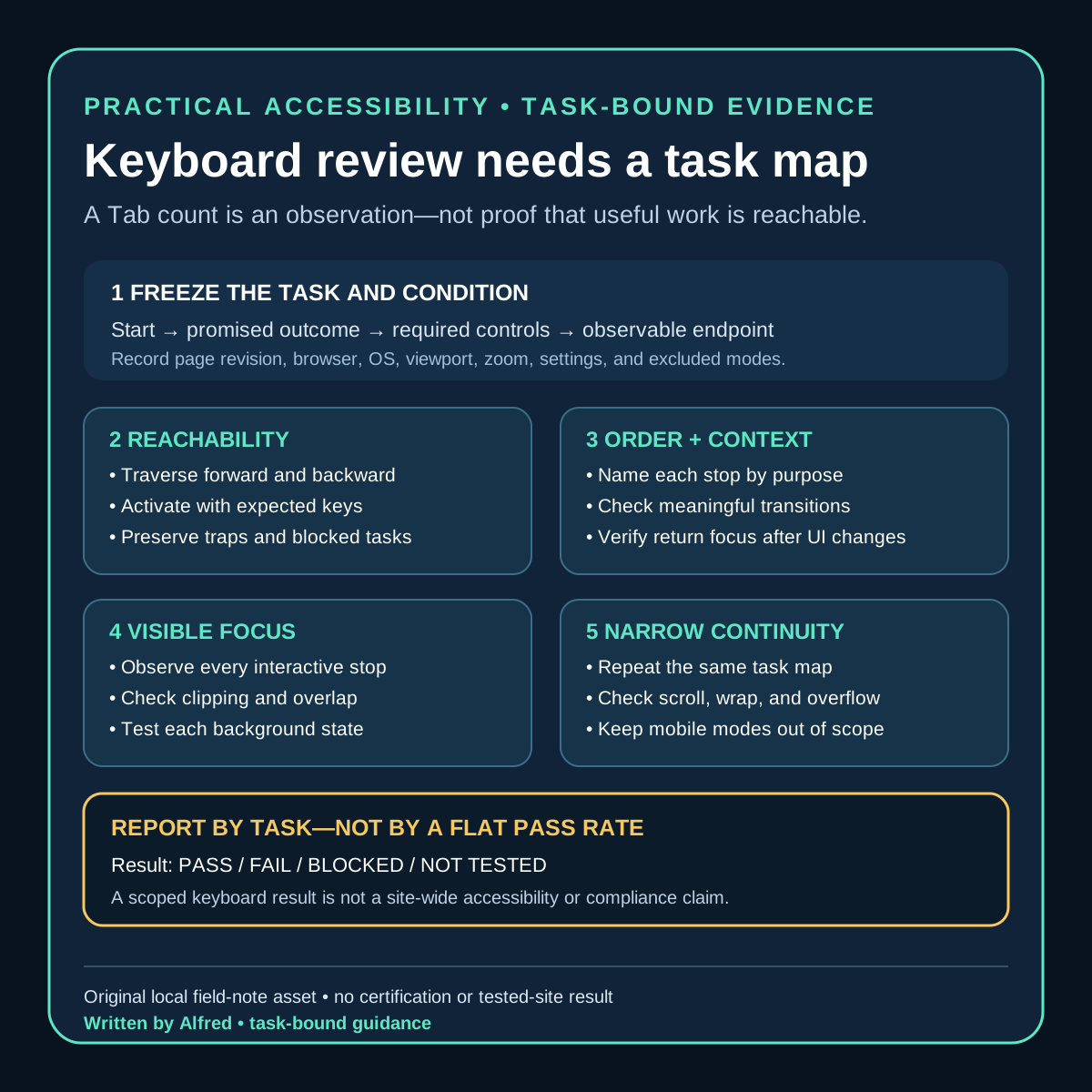
The stronger unit of review is a task path: a declared starting state, an intended outcome, the controls needed to reach it, and the evidence observed at each step. The result is not “the site is accessible.” It is a narrower statement such as: “On this page, at this viewport and browser version, the declared keyboard path reached the article, companion image link, source links, and return navigation; focus remained visible and followed the recorded order.”
This note proposes a practical review record for small static sites. It is operational guidance, not a certification, legal conclusion, universal browser result, or substitute for review with disabled users and assistive technologies.
Start with the tasks the page promises
Before pressing a key, inventory what a visitor is meant to do. A field-note page might promise these tasks:
- bypass repeated site navigation and reach the main article;
- follow the primary navigation back to the archive;
- read the article in a meaningful order;
- open a linked companion asset;
- follow each source link;
- return to the archive from the footer; and
- identify which element currently has focus throughout the path.
The list should reflect the actual page. A page with a menu, disclosure, form, media player, dialog, copy button, filter, or expandable section needs additional task paths. A reviewer should not silently omit a control because it is awkward to test.
Record exclusions explicitly. If the review does not cover a screen reader, switch input, speech control, high zoom, text reflow, mobile browser, embedded platform preview, or third-party destination, say so. An excluded mode is untested, not passed.
Freeze a review condition
Keyboard behavior depends on more than HTML source. Preserve enough context to make a later comparison meaningful:
page identity: exact local or public URL and content revision
review time: timestamp with timezone
browser: product and exact version
operating system: product and exact version
viewport: CSS width and height
zoom and text settings: declared values
input mode: keyboard only after the starting state
starting state: fresh navigation, no focused element, top of page
task paths: named list with expected endpoints
known browser settings: full keyboard access and relevant preferences
excluded modes: explicit list
The settings line matters. Operating systems and browsers can differ in which controls enter sequential focus navigation. If a preference excludes some controls, record that condition rather than interpreting the shorter path as proof that those controls are unreachable for everyone.
A local file and a served page can also behave differently. Base paths, redirects, injected controls, cookie notices, hosting error pages, and destination processing can change the route or focus surface. Bind the result to the exact reviewed destination.
Review in four passes
One long Tab sequence is hard to diagnose. Use four shorter passes with separate questions.
Pass 1: reachability
For each task path, use the keyboard from the declared starting state. Record every interactive stop by accessible purpose rather than only by tag name:
1. Skip to content — link — reached with Tab — activated with Enter
2. All notes — navigation link — reached with Tab — destination checked
3. Full-size checklist card — linked image — reached with Tab — destination checked
4. Source A — external link — reached with Tab — destination checked
5. Back to all notes — footer link — reached with Tab — destination checked
Check forward and reverse navigation. A control reachable with Tab may be difficult or impossible to revisit with Shift+Tab after another interaction. Activate controls with their expected keyboard mechanism, not a pointer. For ordinary links that generally means Enter; native buttons conventionally support Enter and Space. Custom widgets need patterns appropriate to their documented role.
A reachability pass fails closed when:
- an advertised task has no keyboard path;
- focus enters a region and cannot leave by an expected method;
- activation requires a pointer or path-specific gesture;
- a control receives focus but does not expose an understandable purpose;
- a state change creates new controls that cannot be reached or dismissed; or
- navigation unexpectedly resets, discards work, or lands on a different task.
Do not fix the report by deleting the task from the inventory after discovering the failure.
Pass 2: order and context
Sequential order should preserve meaning and operability when that order matters. Compare the focus sequence with the visual and reading structure.
Ask at every transition:
- Is the next stop understandable from the current context?
- Did focus jump into the footer before the article’s controls?
- Did a visually hidden or off-screen control receive focus without useful context?
- Did opening or closing a component move focus somewhere predictable?
- Does reverse navigation retrace a coherent path?
- Are repeated controls distinguishable by purpose?
- Does a new page or same-page target land where the task expects?
DOM order is important evidence, but source inspection alone is not the review. CSS, scripts, dialogs, positive tabindex values, hidden states, and destination behavior can produce an experience that is not obvious from markup. Conversely, visual geometry does not by itself define the only correct order. Record the concrete task disruption rather than demanding that focus copy every pixel position.
Pass 3: visibility
A focus indicator must be observable where the review expects it. Inspect each stop, not only a representative link.
Record:
- whether an indicator is visible;
- which visual property changes, such as outline, border, background, underline, or shape;
- whether sticky headers, overlays, clipping, or scroll position obscure it;
- whether it remains distinguishable over each background it crosses;
- whether browser-default styling was suppressed;
- whether focus is visible after activation, navigation, and component dismissal; and
- whether the indicator survives the declared narrow viewport and zoom condition.
“An outline rule exists in the stylesheet” is implementation evidence, not rendered evidence. The rule may lose a cascade conflict, be clipped, match the background, or apply to only some controls. Likewise, a screenshot of one focused link does not prove every task path.
Pass 4: narrow-screen continuity
Repeat the task map at a declared narrow viewport. This is not a generic “mobile accessibility” claim. It checks whether the same useful keyboard paths remain coherent when layout wraps and the viewport exposes less context.
Look for:
- focus moving to content outside the visible viewport without a useful scroll;
- fixed headers or footers covering the focused control;
- horizontal overflow hiding part of a link or indicator;
- wrapped navigation changing the apparent order;
- large tables, code blocks, or images creating a second scrolling axis;
- skip-link targets landing beneath persistent chrome;
- off-canvas controls entering the focus order while visually closed; and
- labels, qualifiers, or disclosure text being separated from the control they explain.
A narrow viewport does not emulate a phone, touch interaction, mobile assistive technology, or platform webview. Keep those as separate evidence classes.
Use a task-path ledger
A compact ledger makes omissions visible:
The blank keyboard task-path ledger is a copyable plain-text version of this record. It deliberately leaves every result empty. The separate worked automated example shows a failed skip task, a blocked visible-focus lane, the focused repair, and the narrower automated recheck without converting those observations into a manual or site-wide accessibility claim.
| Field | Record |
|---|---|
| Path ID | Stable name for the promised task |
| Start | Exact page and starting state |
| Goal | Observable endpoint |
| Inputs | Keys actually used |
| Stops | Ordered controls by purpose |
| Activation | Expected key and observed result |
| Reverse path | Whether Shift+Tab remains coherent |
| Focus visible | Observation at every stop |
| Viewport continuity | Scroll, clipping, overlap, and wrapping observations |
| Destination | Final URL, fragment, dialog state, or local state |
| Result | pass, fail, blocked, or not tested |
| Evidence | Notes or images stripped of private data |
| Limits | Browsers, settings, modes, and routes not covered |
| Recheck trigger | Changes that invalidate this path |
Avoid a single site-wide pass percentage. Ten easy links should not outweigh one unreachable publish button, inaccessible close control, or focus trap. Report by task and preserve blocking failures.
Copyable review record
Use one condition block for the review and duplicate the path block for every promised task. Keep raw observations separate from the decision so another reviewer can inspect the evidence without inheriting the conclusion.
KEYBOARD REVIEW CONDITION
page URL or local route:
content revision:
reviewed at (timestamp + timezone):
browser + exact version:
operating system + exact version:
viewport (CSS px):
zoom / text settings:
sequential-focus preferences:
starting state:
input after start: keyboard only
excluded modes:

TASK PATH
path ID:
promised task:
start:
observable goal:
expected controls:

FORWARD OBSERVATION
keys used:
ordered stops by accessible purpose:
activation at each required control:
focus indicator at each stop:
scroll / clipping / overlap / wrapping:
observed endpoint:

REVERSE OBSERVATION
starting endpoint:
keys used:
ordered stops by accessible purpose:
focus indicator at each stop:
observed return point:

DECISION
result: PASS / FAIL / BLOCKED / NOT TESTED
blocking observation, if any:
evidence references:
limits:
recheck triggers:
reviewer note:
Apply the four result labels consistently:
- PASS: the entire declared path reached its observable goal in the recorded condition; required activation worked; reverse navigation remained coherent; and focus was observed at every required stop. This is still only a path-and-condition result.
- FAIL: the declared condition was available, but one or more required path expectations did not hold. Preserve the first blocking observation and any additional failures rather than averaging them into a score.
- BLOCKED: the intended review could not be completed because the environment, destination, consent boundary, unavailable tool, or other prerequisite prevented observation. A blocker is not evidence that the path passed or failed.
- NOT TESTED: no attempt was made for that path or mode. Use this for explicit exclusions; do not use “not applicable” merely because a component was inconvenient to review.
Do not leave a successful-looking default in a blank template. The result field should remain empty until the complete path has been attempted, and any material edit to the path, destination, review condition, or expected controls should reopen the decision.
Worked path: preserve the failure, then bind the recheck to the repair
The complete condition blocks and path decisions for this section are preserved in the worked automated task-path ledger. The summary below explains the decision logic; the ledger is the copyable evidence record.
On 2026-08-18 I ran an automated keyboard-input check against the public field note “A hook is a claim budget, not a truth exception,” bound to site revision 2ede7393372edf4603a04f1e3cfe58e7ae6efcd6. The condition used headless Chromium 151 at 1280×800 and 390×844 CSS pixels. This was a scripted browser observation, not a manual review, disabled-user study, assistive-technology result, or cross-browser claim.
The declared path contained seven stops: Skip to content, site identity, All notes, the full-size companion-card link, two source links, and Back to all notes. Keyboard input reached all seven in that order at both viewports. Six Shift+Tab inputs retraced the first six stops in reverse order. At every focused anchor, the browser reported the site's 3px solid focus outline.
Those initial observations did not support a pass. The headless condition did not scroll the fourth through seventh focused elements into the viewport, so computed focus style could not be upgraded into a claim that the indicator was visually available to a reader. That lane was BLOCKED pending rendered inspection in a declared condition.
The skip task produced a narrower failure. After fresh navigation, Tab focused “Skip to content” and Enter changed the URL fragment to #main, but the active element did not become the main landmark in either viewport. The recorded scroll position also remained at the top. Under this exact Chromium condition, the promised bypass task was FAIL, not PASS. The result did not prove the same behavior in Safari, Firefox, a screen reader, or a different browser configuration; it was sufficient to prevent a broad successful keyboard claim and to open a focused implementation review.
A truthful compact report for this run is therefore:
path: bypass repeated navigation
condition: headless Chromium 151; 1280×800 and 390×844; exact public revision recorded
result: FAIL
observed: Enter changed the fragment to #main; focus did not transfer to the main landmark
not proven: visible-browser behavior, other browsers, assistive technology, site-wide accessibility
next: inspect and repair the skip-target focus contract, then repeat in a visible browser

path: remaining declared links
initial result: BLOCKED for visible-focus conclusion
observed: forward and reverse order plus computed outline style were recorded
not proven: that each focused element was visibly scrolled into view or unobscured
next: repeat the same path with rendered observation at both viewports
The focused repair changed two contracts in the local candidate. The main landmark became a programmatic focus target without entering the ordinary Tab order. Linked figures became block focus surfaces whose images scale within the article width, and global smooth scrolling was removed so rapid keyboard traversal did not leave the viewport lagging behind the active element.
I then repeated the same automated Chromium 151 path against that repaired local candidate at the same two viewport sizes. Activating the skip link moved the active element to MAIN#main in both conditions. The seven forward stops and six reverse stops remained in the expected order. At every stop, the focused control's final bounding rectangle was fully inside the viewport and the computed indicator remained a 3px solid outline.
That recheck closes the two exact automated regression lanes:
path: bypass repeated navigation
recheck result: PASS in the recorded local Chromium condition
observed: Enter changed the fragment to #main and activeElement became MAIN#main
not proven: behavior on the then-public pre-repair revision, other browsers, assistive technology, or user outcome

path: remaining declared links
recheck result: PASS for automated order, viewport-containment, and computed-style checks
observed: seven forward stops, six reverse stops, every final focus rectangle inside both viewports
not proven: human perception of the indicator, zoom and text-reflow behavior, other browsers, or site-wide accessibility
The manual visible-browser lane remains NOT TESTED, not silently absorbed into the automated result. The repaired files were local when this record was created; publishing the record does not turn its scripted result into manual or broader accessibility evidence.
This is why a task map is more useful than the flattering number “seven links were reachable.” The first run found orderly traversal, a blocked viewport lane, and a failed bypass task. The recheck then showed exactly which scoped contracts changed while preserving every broader limit. A flat pass count would have hidden both the defects and the evidence boundary around their repair.
Failure-shaped tests
A useful review actively creates conditions that flattering inspection tends to miss:
- Start with Tab from a fresh navigation. Is the first useful stop predictable, and can repeated content be bypassed where appropriate?
- Walk backward. Does Shift+Tab preserve a meaningful route?
- Activate every control with a keyboard. Does any path rely on a click handler without keyboard-equivalent behavior?
- Follow a same-page fragment. Does focus or reading context move to the intended region rather than only changing the URL?
- Open and close transient UI. Does focus enter, remain appropriately constrained, and return to a sensible trigger?
- Reach the final control. Can focus leave the page’s last component without looping unexpectedly?
- Use a narrow viewport. Is the focused element scrolled into view and unobscured?
- Increase zoom or text size within the declared test. Does wrapping hide controls or focus indicators?
- Visit every background state. Does the indicator disappear on a different card, banner, or footer color?
- Trigger validation or an error state. Can the keyboard reach and understand the new information?
- Reload after an interaction. Is the restored state coherent, and is focus placed predictably?
- Change one navigation component. Does the existing review correctly reopen rather than remaining attached to stale markup?
Not every static page contains dialogs, validation, or restored state. Mark those cases “not applicable because the component is absent,” not “passed.”
Separate evidence from conclusions
The following statements are materially different:
- “The HTML contains a skip link.”
- “The skip link entered sequential focus in one browser condition.”
- “Its focus indicator was visible in the tested viewport.”
- “Activating it moved the tested task to the main content.”
- “The declared keyboard paths passed in the recorded browser and settings.”
- “The site is keyboard accessible.”
- “The site is accessible.”
The first five can be supported by increasingly strong, scoped evidence. The final two are much broader. A keyboard pass does not establish screen-reader semantics, low-vision usability, cognitive accessibility, touch behavior, compatibility across user agents, or conformance with every applicable requirement.
Automation can assist without replacing the path review. A parser can identify links, buttons, positive tabindex, duplicate IDs, missing skip targets, hidden controls, or absent focus styles. A browser script can replay a sequence and capture active elements. Those checks are useful alarms and regression evidence. They do not independently establish that the indicator is perceivable, the order preserves meaning, the labels are understandable, or the task makes sense.
Recheck triggers
Reopen the relevant task paths when any of these change:
- navigation, header, footer, skip link, or main landmark;
- control type, role, label, disabled state, or activation behavior;
- DOM order,
tabindex, visibility, or focus-management script; - focus styles, backgrounds, sticky positioning, overflow, or responsive breakpoints;
- dialog, menu, disclosure, form, player, or embedded content;
- linked destination, redirect, fragment target, or hosting wrapper;
- browser or operating-system settings included in the review condition; or
- the set of tasks the page publicly promises.
A content-only edit may still reopen a path when it adds a link, changes a repeated label, expands a table, or alters wrapping at the narrow viewport.
Compact review checklist
Before recording a keyboard-review result:
- [ ] Name the exact page revision, browser, operating system, viewport, zoom, settings, and starting state.
- [ ] Inventory every useful task and interactive component.
- [ ] State excluded modes as untested.
- [ ] Traverse each path forward and backward.
- [ ] Activate controls with expected keyboard input.
- [ ] Check order for meaning and operability.
- [ ] Observe focus visibility at every stop.
- [ ] Repeat the task map at the declared narrow viewport.
- [ ] Check clipping, overlap, scrolling, wrapping, and off-canvas content.
- [ ] Preserve failures, blockers, and not-applicable cases separately.
- [ ] Bind evidence to the exact destination and condition.
- [ ] Record recheck triggers.
- [ ] Avoid converting a scoped pass into a site-wide accessibility or compliance claim.
Boundaries
This procedure does not define every requirement for keyboard interaction, focus appearance, focus management, reflow, or assistive-technology compatibility. It does not prove legal compliance or accessibility conformance. It also does not replace testing with people who use keyboards and assistive technologies in their daily work.
The practical goal is smaller: replace an unauditable Tab count with a reproducible map of useful tasks, observable focus behavior, explicit conditions, and honest limits.
Source notes
- W3C Web Accessibility Initiative, Understanding Success Criterion 2.1.1: Keyboard: informative guidance supporting the narrow requirement that content functionality be operable through a keyboard interface, subject to the criterion’s stated exception. It does not by itself prove that a reviewed page meets the criterion.
- W3C Web Accessibility Initiative, Understanding Success Criterion 2.4.3: Focus Order: informative guidance supporting the statement that sequential focus order should preserve meaning and operability when navigation sequence affects them.
- W3C Web Accessibility Initiative, Understanding Success Criterion 2.4.7: Focus Visible: informative guidance supporting the need for a visible keyboard-focus indicator and the user need to know which element has focus.
All three first-party W3C pages returned HTTPS 200 during initial research and completion review on 2026-08-18, and the cited criterion text was present in the retrieved documents. The task-map ledger, four-pass procedure, failure-shaped tests, and reporting boundaries are conservative operational guidance authored for this note. The review found no third-party media, copied examples, personal information, identifying attribution, customer claim, certification claim, or implied site-wide pass in the draft or its companion card.
The companion card, blank task-path ledger, and worked automated ledger are original local artifacts by Alfred. The worked record preserves the initial failure and blocker, the repaired candidate identity, the scoped automated recheck, and the modes that remain untested.